Salon • Best Practice
Salon Reports: How to Use Data to Grow Your Revenue
Salon Reports: How to Use Data to Grow Your Revenue
Salon Reports: What They Are, Why They Matter, and How To Act on Them
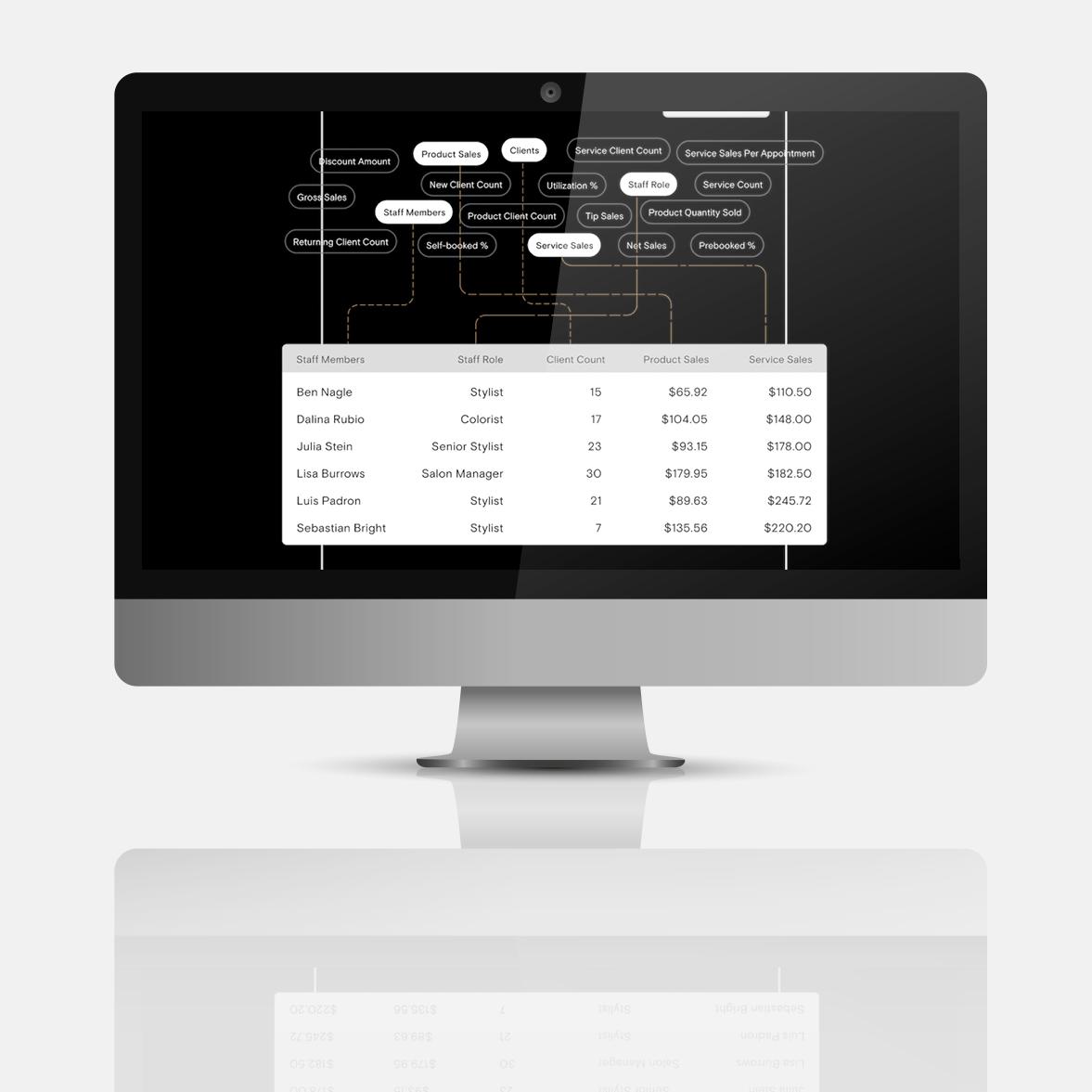
A salon report is a structured snapshot of your business performance that reveals valuable data across revenue, operations, and client activity. For salon owners focused on expansion and efficiency, salon reports turn anecdotes into clear patterns that help drive decisions. And with the right salon support software (like Boulevard), salon data surfaces automatically, giving you real-time visibility into every part of your business.
What’s a salon report? |
|---|
A salon report summarizes data from a salon management system that tracks key business metrics. These metrics can include everything from sales revenue and inventory levels to client retention rates and staff performance. Salon owners and operators can use these reports to identify trends, make informed decisions, and measure progress toward business goals. |
In this guide, we’ll explore different types of salon reports and what each reveals about your business. We’ll also look at strategic reporting cadences and how to use analytics to empower your decisions.
Why Salon Reports Are Essential for Business Growth
Your first instinct to grow revenue might be to focus on increasing foot traffic. However, growth comes from a number of places, and quiet inefficiencies can drain resources where you least expect it. Maybe you underpriced your most popular service, for example, which limits overall revenue potential.
Without strong visibility, it’s hard to spot where your services are optimized and where they slip. Salon reports bring these dynamics into focus by organizing business data into structured, readable insights.
With Boulevard’s salon reporting software, you can get this visibility in real time via a centralized dashboard. It surfaces client behavior, staff performance, and inventory data in a single place. You can customize reports with a variety of filters and the ability to drill down into granular line-item details. That visibility is what makes salon reports so useful: They aren’t just records of what happened, but a clear map of how your business actually runs.
5 Types of Salon Reports (and What Each One Tells You)
Salons have a lot of moving parts, and none of them operate in isolation. Different types of reporting systems break your daily operations into clear, connected reports so you can see how each part affects overall business performance. Here are five of the most important types.
1. Sales Reports
Sales reports show how you’re generating revenue, and where your offerings and their prices impact your finances overall. They help you get granular and understand what contributes most to each ticket, not just lump sums. This makes it simpler to adjust pricing strategies and refine your mix of services.
Key inputs include average ticket sizes, total sales, and breakdowns between services and retail sales, which can be refined further by stylist and location.
2. Client Retention Reports
Client retention reports show how clients move through your business over time. They often point to metrics relevant to marketing and service issues, like loyalty program churn or individual stylists seeing fewer return visits. These salon reports pinpoint what impacts retention before it seriously depletes your revenue.
Booking frequency and no-show rates are common metrics used to get a broad view of retention. That data can guide outreach and service improvements, such as automated appointment reminders and more training for team members who seem to be struggling. Comparing retention rates and new versus returning client ratios can then help you measure if your adjustments made a difference down the road.
3. Staff Performance Reports
Staff performance reports show how each team member contributes to overall revenue and client experience. This is a good example of reports that support broader business performance analysis, since staff performance overlaps with client management and sales.
On its own, revenue per stylist, staff retention, and productivity rates reveal how individual stylists build their books. For example, a performance report for a fully booked stylist might show they’re bringing in a lot of revenue and repeat clients, but are only making 10% commission on each session. This insight clues you in that it’s time to raise their commission rate or salary to recognize their job well done.
4. Inventory Reports
Inventory reports show how product movement connects to service and retail performance. They identify what product lines are the most popular and when overstocking ties up cash flow. Essentially, this data helps you understand whether your retail options have enough demand to be profitable and adjust inventory management accordingly.
Product sales velocity, stock levels, and low-inventory alerts highlight what’s moving. That visibility guides purchasing decisions to curb excess spending and reduce how much you’re wasting, or stock more of clients’ favorite options.
5. Financial Reports
Financial reports show how money flows through the business. They bring together transactions and ticket totals so you can understand your salon’s overall financial health. These reports make it simple to spot trends in cash flow and keep operations aligned with performance.
End-of-day totals and tax liability summaries clarify where revenue comes from and how your team processes it. That visibility supports better forecasting and clear bookkeeping, so you know when it’s time to focus on new marketing campaigns and when you can start planning your next big move.
How Often Should You Run Salon Software Reports?
Create a consistent rhythm for reviewing data so pain points and opportunities don’t get lost in a sea of data. But not all salon reports need to be reviewed at the same cadence. Some software systems, like Boulevard, support automated alerts to surface important metrics without you having to manually pull every report.
To get started, here’s our suggestions on when to look at different types of reports for your salon.
Frequency | What to review | Why |
Daily | End-of-day sales total and register summary. | Confirms that transactions match expectations and keeps a close eye on day-to-day sales performance. |
Weekly | Staff performance and appointment no-shows. | Highlights problematic short-term operational patterns, like productivity drops or gaps in client retention, before they turn into long-term problems. |
Monthly | Client retention rate, average ticket size, inventory levels. | Shows whether your business is financially on track based on revenue, loyalty, and stock management. |
Quarterly/ Annually | Revenue trends, year-over-year growth, tax reporting. | Provides a clear view of business health to support financial planning, forecasting, and regulatory compliance. |
How to Turn Salon Report Data Into Action With Boulevard
Sales reports are easier to manage when they’re tied to clear performance benchmarks. Start by deciding what strong performance looks like for the business as a whole, then define specific targets.
For instance, you might set a top-line goal of a 10% increase in quarterly sales revenue, then break it up into smaller benchmarks. That could include optimizing schedules to avoid awkward gaps and raise availability for time-consuming, high-margin services, and studying provider rebooking rates to see who has the most room to grow.
Boulevard’s real-time reporting dashboard makes this process easier by centralizing performance data in a single place. Users can customize visibility by location, service, and staff members to drill down details that support positive growth. By using Boulevard’s reporting dashboard, you can make sure every action aligns with your goals and scale accordingly.
FAQ
What Types of Reports Should a Salon Run?
The exact kinds of reports you should pull depends on your long-term goals and the benchmarks you use to measure progress. The most useful insights usually come from reading reports together. For example, you can pair staff performance with sales and retention data to understand where revenue spikes.
How Often Should I Run Salon Reports?
Rather than pulling data when a problem appears, regular analysis helps you stay proactive. Reports are most effective when they’re part of a regular operating rhythm, broken up into short and long-term reporting. Some reports should be run daily, while others can wait until an annual review.
What Metrics Should a Salon Track?
There are dozens of options you can personalize based on your salon’s strengths and pain points, but a few essentials are revenue growth, client retention, and staff productivity. From there, you can get granular with average ticket size and inventory movement to connect larger financial changes to client behavior and operational efficiencies.
How Does Boulevard Help Salon Owners Make Sense of Their Data?
Boulevard gives salon owners the flexibility to go beyond surface-level reporting. Start with built-in report templates, then customize fields, groupings, and saved views to standardize your system. For teams that want to become reporting experts, Boulevard Academy offers reporting courses that show users how to build custom reports and turn raw data into actionable operational insights.

Shanalie Wijesinghe
Content Strategy Director
Shanalie Wijesinghe is the Content Strategy Director at Boulevard. She lends her industry and platform expertise to both in-house staff and partner salons and spas. A salon industry veteran with more than 15 years of experience working for high-end luxury salons such as Sally Hershberger and BENJAMIN, Shanalie was previously Director of Education for Boulevard and blends her knowledge of the beauty and technology industries to help put the company’s partners and employees on the path to success. A Bay Area native and first-generation immigrant, Shanalie is a graduate of the Paul Mitchell School specializing in cosmetology, styling, and nail instruction.
Related Posts

The Essential Guide for Maximizing Medspa Revenue
Maximize your medspa revenue by optimizing your business’s budget, creating worthwhile membership programs, and analyzing detailed business reports.
Read ArticleBeauty Business Revenue Analysis: Find and Fix Leakages
Learn how to perform a practical beauty business revenue analysis for your salon, spa, or medspa. Find and fix gaps that cause revenue leaks.
Read Article
How to Grow Your Salon Business and Increase Revenue
Want to grow your salon business? Learn 10 of Boulevard’s data-backed strategies, from pricing and referrals to memberships and data, that actually work.
Read Article
Measuring What Matters: The 5 Essential KPIs for Self-Care Industry Owners
How do you know if your self-care business is on the path to success? Start by analyzing the data and focusing on these key performance indicators.
Read Article
Be the Boss of Your Commission by Watching These Metrics
These are the most important KPIs beauty businesses should track to maintain sustainable growth.
Read Article
Pulse Check: How to Use Spa Reporting Tools to Maintain Business Profitability
Spa reporting tools can boost your revenue by helping you fine-tune your menu, raise inventory efficiency, and save time in tax season. Read this to learn how.
Read Article
4 Ways to Utilize Reporting For Your Multi-Location Self-Care Business
More beauty business locations means more revenue, but it also means more noise. Cut through the chatter and find what matters with these reporting tips.
Read Article
How to Run a Hair Salon: Key Steps and Essential Software
Learn how to run a hair salon with this step-by-step guide. We’ll cover business planning, tools, hiring, and marketing tips for long-term growth.
Read Article
How Reporting Tools Lead to Confident Decision Making
From setting prices to load-balancing schedules, salons and self-care businesses always benefit from insightful reports.
Read ArticleSign up for weekly blog updates.